
Banner Ad Design: Sizes, Layout Tips and Specs
How do you design a banner ad?
Design a banner ad by choosing the sizes you will run, writing one short message, and building a simple layout with your logo, a clear image and a visible call-to-action button. Keep text large enough to read on a phone, use your brand colors so people recognize you, and export each size under the ad network’s file limit. For Google image ads, that limit is 150 KB per file.
This guide covers the banner sizes worth starting with, what to put in a banner, layout and color tips, how responsive display ads change the work, and a checklist to use before you upload. Pros Inc designs ads, logos and brand identities for small businesses from our office in San Diego, and we build banner sets alongside the landing pages they send traffic to. Specifications come from Google Ads Help and the IAB, read as of October 2026.
What is a banner ad?
A banner ad is a rectangular image ad shown on websites and apps. You will also hear the terms display ad and web banner. Banner ads appear in fixed slots on a page, such as across the top, down the side, or between paragraphs of an article.
There are two common ways to run them:
- Uploaded image ads. You design each size yourself and upload finished files. You control every pixel.
- Responsive display ads. You upload separate pieces, such as images, logos, headlines and descriptions, and the ad network assembles them to fit each slot.
Most small businesses use both: a few hand-designed banners for key sizes, plus a set of responsive assets that fill the rest.
Banner ad sizes to start with
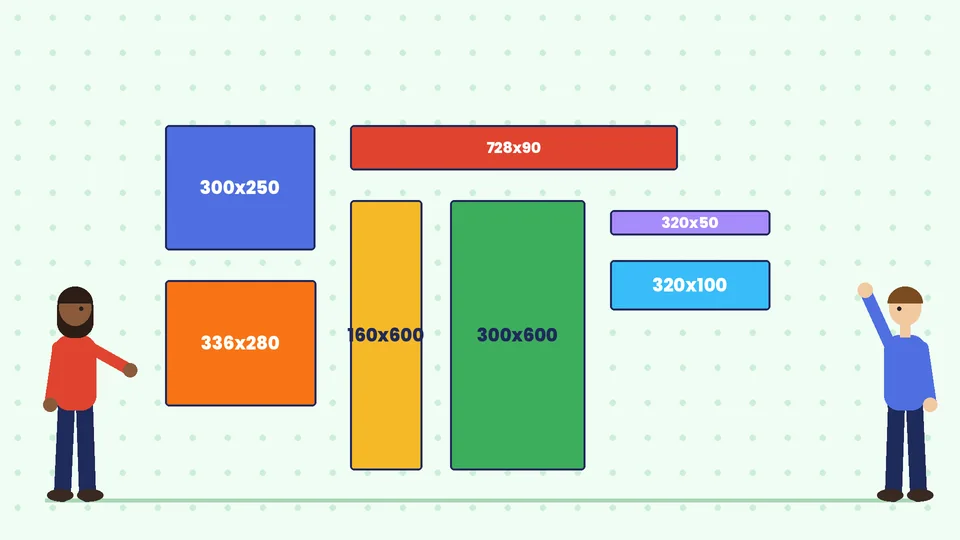
Google Ads lists more than twenty sizes for uploaded image ads in its uploaded display ads specifications. You do not need all of them on day one. These sizes cover a large share of desktop and mobile placements:
| Size (pixels) | Name | Where it often appears |
|---|---|---|
| 300 x 250 | Inline rectangle | Inside articles and sidebars |
| 336 x 280 | Large rectangle | Inside articles |
| 728 x 90 | Leaderboard | Across the top of desktop pages |
| 300 x 600 | Half-page ad | Desktop sidebars |
| 160 x 600 | Wide skyscraper | Narrow desktop sidebars |
| 320 x 50 | Mobile banner | Top or bottom of mobile screens |
| 320 x 100 | Large mobile banner | Mobile pages |
| 970 x 250 | Billboard | Top of wide desktop pages |
The same Google page lists GIF, JPG and PNG as the accepted image formats, with a maximum file size of 150 KB. Animated GIF ads must stop animating after 30 seconds and run slower than 5 frames per second. HTML5 ads are uploaded as a ZIP file, which must stay under 600 KB.
The IAB, the industry group that publishes ad standards, encourages designers to plan for flexible sizes as well. Its New Ad Portfolio guidelines describe ads that adapt to different screens rather than one fixed rectangle, which is why responsive assets matter.
What to put in a banner ad
A banner is seen for a second or two, often while someone is reading something else. Every element has to earn its space.
Your logo
Place the logo in the same corner on every size so the set feels like one campaign. Use a version that stays clear when small. Our guide to logo file formats explains which files to hand to whoever builds your ads.
One message
Pick a single idea: an offer, a product or a reason to visit. “Free design consultation” works better than a list of five services. On small sizes such as 320 x 50, you may only have room for four or five words.
A clear image
Use one strong product photo or illustration. Busy scenes turn into noise at banner size. Crop tightly so the subject fills the space.
A call-to-action button
Draw the button as a button: a solid shape with short text such as “Get a quote” or “Shop now.” Give it a color that contrasts with the background so it stands out.
Layout and design tips
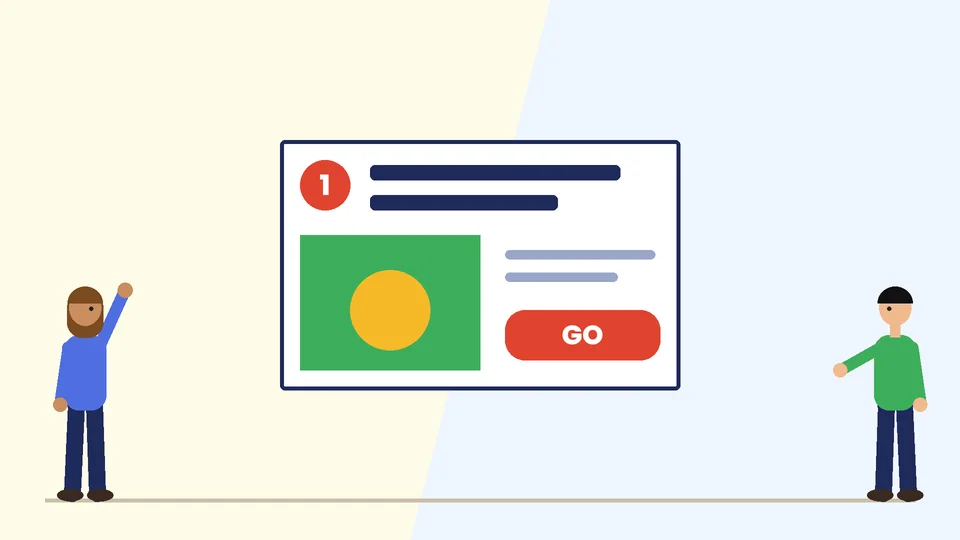
Design the hardest sizes first. A 728 x 90 leaderboard and a 300 x 600 half-page ad have very different shapes. If your layout works in both, it will adapt to the rest.
Keep text large. Text that looks fine on your monitor can be unreadable on a phone. The WCAG contrast guideline asks for a contrast ratio of at least 4.5:1 for normal text and 3:1 for large text, a useful target for ad copy too.
Use your brand colors and fonts. Repeat the colors and typefaces people already see on your website. Our guides to choosing a brand color palette and brand fonts explain how to set these up once and reuse them.
Leave breathing room. Space around the logo, message and button makes a small ad easier to scan. Cramming in more text usually lowers clarity.
Add a border on light backgrounds. A white banner on a white web page can disappear. A thin gray or colored border defines the edge.
Match the landing page. The page people reach after clicking should repeat the headline, image and offer. A mismatch makes visitors wonder if they are in the right place. Our landing page design guide covers that side of the campaign.
Designing assets for responsive display ads
With responsive display ads, you supply parts rather than finished banners. Google’s best practices guide for responsive display ads recommends these image sizes:
| Image type | Ratio | Recommended size | Minimum size |
|---|---|---|---|
| Horizontal | 1.91:1 | 1200 x 628 | 600 x 314 |
| Square | 1:1 | 1200 x 1200 | 300 x 300 |
| Vertical | 9:16 | 900 x 1600 | 600 x 1067 |
You can upload up to 15 images, and each can be up to 5120 KB. The same guide gives design advice that differs from hand-built banners:
- Do not overlay your logo on images. The logo is a separate asset, so adding it to the photo can repeat it in some layouts.
- Avoid text on top of images. Overlaid text can be repeated by the headline or become unreadable when the image is shrunk.
- Use a clean, cropped logo. Avoid extra decoration or busy backgrounds behind it.
- Write clear headlines. Describe the product or service in plain words and avoid click-bait.
As of October 2026, Google’s help page also says Display campaigns are moving into Demand Gen campaigns, with a migration tool for eligible advertisers. Check the current Google specifications before you migrate or launch, because the help pages change over time.
Static or animated banners?
Static banners are simpler to make, load faster and work everywhere. Animation can draw the eye, but it adds production time and has rules. Google, for example, limits animation length for GIF ads to 30 seconds.
If you animate, keep it short: show the message, then the offer, then end on a frame with your logo and button. That final frame should work as a static banner on its own, because many people will only see it.
Banner ad checklist
Before you upload, check that:
- each size uses the same logo position, colors and fonts;
- the message is one idea, readable on a phone;
- the call-to-action looks like a button and contrasts with the background;
- light banners have a border;
- every file is in an accepted format and under the size limit;
- animated files stop within the allowed time;
- the landing page repeats the offer and headline;
- you have saved the source files and fonts in your brand style guide so the next campaign is faster.
Frequently asked questions
What is the most common banner ad size?
How big can a banner ad file be?
How much text should a banner ad have?
What is the difference between a banner ad and a responsive display ad?
Should I put my logo on every banner?
Can I use the same design for print flyers and banner ads?
Get banner ads that match your brand
A consistent set of banners helps people recognize your business wherever your ads appear. If you need a banner ad set, responsive display assets or a landing page to go with them, contact Pros Inc at 715 J St #200, San Diego, CA 92101, or call (858) 652-8920.