
Book Cover Design: How to Design a Cover That Sells
What makes a good book cover design?
A good book cover design tells a reader the genre, the tone and the title in about the time it takes to scroll past a thumbnail. It uses one strong image or idea, a title that is readable at small sizes, an author name that is easy to find and a layout built to the printer’s exact measurements. For a print book, that means a single file that wraps the back cover, spine and front cover with bleed on every outside edge. For an ebook, it means a front cover only, sized and saved to the store’s specifications.
This guide explains how to plan a cover, what goes on the front, spine and back, the print and ebook file specifications from Amazon Kindle Direct Publishing (KDP), typography and color choices, and a checklist to run before you upload. Pros Inc designs logos, print pieces and packaging for small businesses and authors from our office in San Diego. The technical requirements below come from KDP’s help pages, read as of October 2026. Other printers and distributors use different numbers, so always check the specifications for the service you use.
Start with the reader, not the artwork
Before you open a design program, answer three questions:
- Who is the book for? A thriller reader, a small business owner and a parent buying a picture book each expect a different look.
- Where will people see the cover first? For many books, the first view is a small thumbnail on a store page or a phone. The cover has to work at that size before it works on a shelf.
- What should the cover promise? One clear idea works better than a collage of every theme in the book.
Look at the current best sellers in your category and note what they have in common: type style, color range, image style and how much of the cover the title takes up. You don’t want to copy them, but a cover that ignores its genre’s conventions can confuse the readers it is meant to attract. A business book that looks like a fantasy novel will be skipped by both audiences.
The parts of a print book cover
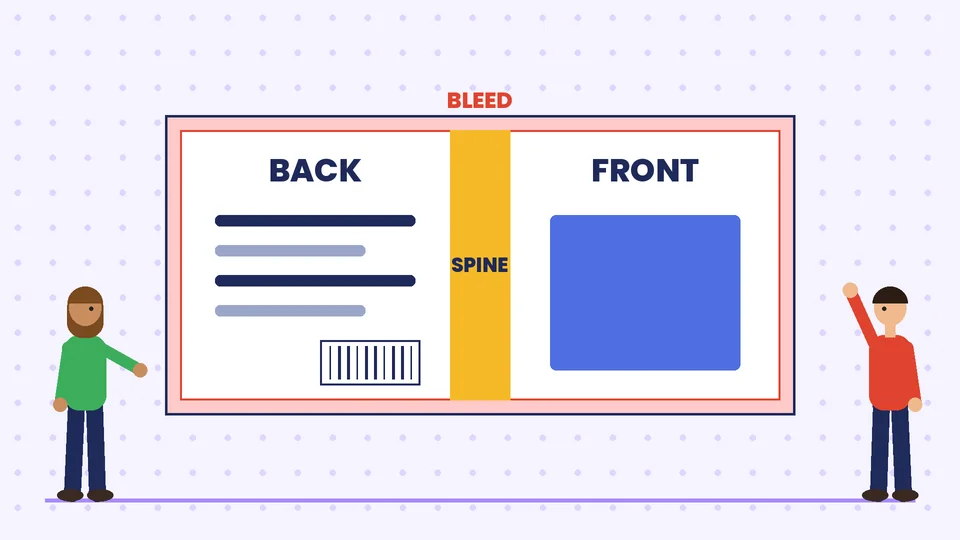
A paperback cover is one flat piece that wraps around the book. According to KDP’s guide to creating a paperback cover, the cover must be a single PDF that includes the back cover, spine and front cover as one image.
Front cover
The front cover carries the title, the author name and the main image. It may also carry a subtitle, a short endorsement or a series name. Keep it simple. Every extra line makes the title smaller and the thumbnail harder to read.
Spine
The spine shows the title and author name when the book sits on a shelf. KDP only allows spine text on books with at least 79 pages, and its help page notes that the minimum is 80 pages if you use its Cover Creator tool. If your book is shorter, leave the spine blank, because a cover with spine text on a thinner book will be rejected.
KDP calculates spine width from the page count and paper type. As of October 2026, its help page lists these multipliers:
| Paper | Spine width per page |
|---|---|
| White paper (black and white interior) | 0.002252 in (0.0572 mm) |
| Cream paper (black and white interior) | 0.0025 in (0.0635 mm) |
| Premium color paper | 0.002347 in (0.0596 mm) |
| Standard color paper | 0.002252 in (0.0572 mm) |
For example, a 200-page book on white paper has a spine of about 0.45 inches (200 x 0.002252). Spine text needs at least 0.0625 inches (1.6 mm) of space on either side, because every book binds slightly differently.
Back cover
The back cover usually holds a short description, a few endorsements, an author photo or bio and the barcode. KDP says you can upload a cover with or without a barcode, and if you don’t supply one, it places one on the back cover for you. Leave that area clear either way.
Bleed, safe area and trim
Printed books are trimmed to size after printing, and the blade never cuts in exactly the same place. To avoid thin white edges, KDP asks for 0.125 inches (3.2 mm) of bleed on the top, bottom and outside edges of the cover. Any background color or image must run all the way into the bleed.
The cover size formula from KDP is:
- Cover width = bleed + back cover width + spine width + front cover width + bleed
- Cover height = bleed + trim height + bleed
Text has to stay inside the safe area. KDP says front and back cover text should sit at least 0.125 inches (3.2 mm) inside the trim lines, and no front or back text should run into the spine. KDP also advises against thin borders near the edge because of a 0.125 inch production variance. If you do use a border, it should sit at least 0.25 inches (6.4 mm) inside the trim line.
The easiest way to get every measurement right is KDP’s own cover calculator and template generator. You enter the trim size, paper and page count, and it produces a template showing the full cover, spine, safe areas and barcode margin. Design on top of the template, then hide the template layer before you export.
Print file specifications
KDP’s paperback cover requirements, as of October 2026, include:
- File type: a single PDF with back cover, spine and front cover as one image.
- File size: files over 650 MB won’t convert, and KDP recommends 40 MB or less.
- Images: CMYK color, sized at 100%, flattened and placed at a minimum of 300 DPI.
- Text: at least 7-point type, with enough contrast against the background.
- Color: no spot colors such as Pantone inks, no mixed color spaces, and no embedded color profiles, which KDP removes anyway.
- Before upload: flatten transparencies, embed fonts, remove crop marks, color bars and template text, and remove file security.
KDP also says the text on your cover must exactly match the book details you entered during setup, including the title, author name and edition. A subtitle on the cover that differs from the subtitle in your listing is a common reason for a delay.
If you print with another service, such as a local printer or a different print-on-demand company, the bleed, spine formula and file rules may be different. The design approach stays the same, but get their template before you start.
Ebook cover specifications
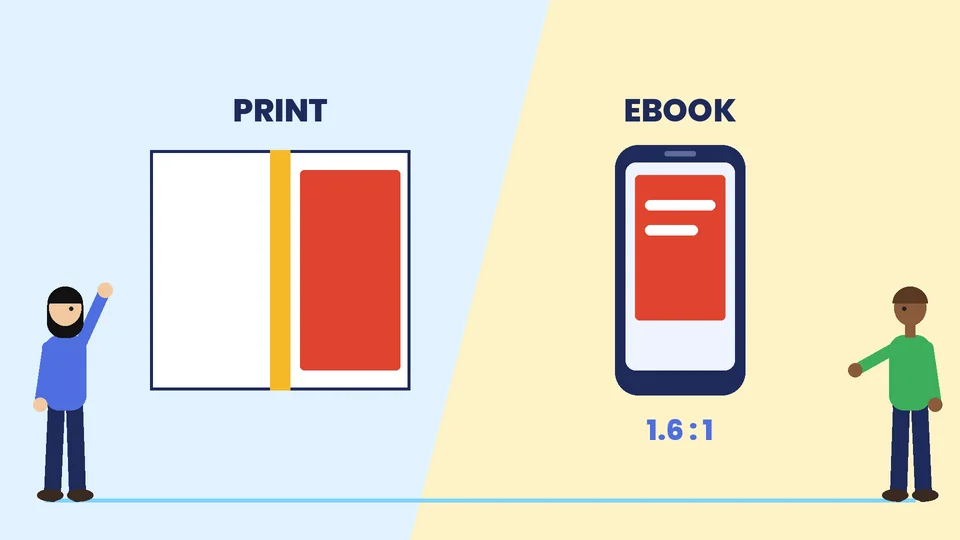
An ebook only needs the front cover. KDP’s page on ebook cover image criteria lists these specifications as of October 2026:
| Specification | KDP requirement |
|---|---|
| Format | JPEG or TIFF |
| Ideal size | 2,560 pixels high by 1,600 pixels wide |
| Minimum size | 1,000 pixels high by 625 pixels wide |
| Maximum size | 10,000 pixels on either side |
| Ratio | height to width of at least 1.6 to 1 |
| File size | under 50 MB |
| Color | RGB |
KDP also suggests a narrow medium gray border, 3 to 4 pixels wide, for covers with white or very light backgrounds, so they don’t disappear against a white store page.
Most authors design the print front cover first and adapt it for the ebook. Because the ratios are different, you may need to extend the background or move the title. Check the ebook version at thumbnail size, since that is how most shoppers will see it.
Typography on a book cover
The title is the most important element on most covers. A few rules help:
- Pick a type style that fits the genre. Bold sans serif type suits many business and self-help books, while serif type often suits literary fiction and history. A script face can work for romance but is hard to read small.
- Make the title big. If you can’t read it on a phone-sized thumbnail, it is too small or too detailed.
- Limit yourself to one or two typefaces. One for the title and one for the author name and supporting text is usually enough. Our guide to brand fonts covers how to pair type.
- Watch line breaks. Split long titles at natural phrases, and don’t leave a single short word on its own line.
- Check licenses. Some free fonts are licensed for personal use only. Make sure your font license allows commercial use on a product.
The author name gets more space as an author becomes better known. For a first book, the title usually leads.
Color and imagery
Color sets the mood before a reader takes in any words. Dark, high-contrast palettes suit thrillers. Bright, clean colors suit business and how-to books. Soft, warm tones suit memoir and romance. Our article on building a brand color palette explains how to choose colors that work together.
For imagery, you have three main options:
- Illustration, which gives you full control and is common for children’s books, fantasy and many nonfiction titles.
- Licensed photography, which is common for thrillers, romance and memoir. Read the license carefully, because some stock licenses limit print runs or exclude book covers.
- Type-only covers, which rely on bold typography and color. They suit many business books and work very well at small sizes.
Whichever you choose, make sure you have the rights to every image and font on the cover. KDP reminds publishers that they must have all rights necessary for the content of the cover image.
If the book is part of your brand
Many small business owners write a book to support their business. In that case, the cover should feel related to the rest of your marketing without looking like a brochure. Use your brand colors or typeface where they suit the genre, and keep your logo small, on the spine or back cover rather than the front. A consistent look across your book, brochures and website helps readers connect the book to your business. If you already have a brand style guide, give it to your designer at the start.
Common book cover mistakes
- Too much text on the front cover.
- A title that disappears at thumbnail size.
- Text placed too close to the trim or the spine.
- Spine text on a book that is too thin for it.
- Low-resolution images that look sharp on screen but print soft.
- Cover text that doesn’t match the book details in the store listing.
- Using an image or font without the right license.
- Designing in RGB and never checking how the colors convert to CMYK for print.
Book cover design checklist
- Genre research done, with notes on what readers in that category expect.
- Exact trim size, paper and page count confirmed, and the printer’s template downloaded.
- Bleed of 0.125 inches on outside edges, with backgrounds extended into it.
- All text inside the safe area and off the spine edges.
- Spine text only if the page count allows it.
- Images at 300 DPI or higher at their printed size, in CMYK for print.
- Fonts embedded, transparencies flattened and template layers removed.
- Cover text matches the title, subtitle and author name in the listing.
- Ebook version checked at thumbnail size, in RGB and at the right ratio.
- A printed proof copy ordered and checked before release.
Frequently asked questions
What size should a book cover be?
How do I calculate the spine width?
Can I put text on the spine of a thin book?
What resolution does a print book cover need?
Should my ebook cover match my print cover?
Do I need a barcode on my book cover?
Get a book cover that sells the book
A cover is the first thing a reader judges, and a technical mistake can hold up a launch. Start with the reader, build on the printer’s template, keep the title readable at thumbnail size and order a proof before release. If you would like help with a cover that fits your genre and your brand, contact Pros Inc at 715 J St #200, San Diego, CA 92101, or call (858) 652-8920.