
Catalog Design: Layout, Page Count and Print Setup

What makes a good catalog design
A good product catalog helps buyers find what they need, compare options and order without calling you first. That means a clear structure by category, a consistent layout for every product, accurate prices and specifications, strong product images and an easy way to order. For print catalogs, it also means a page count and file setup that your printer can produce, and for digital catalogs, pages that read well on a phone.
This guide covers how to plan a catalog, how to lay out product pages, how to set up a printed catalog, how to make a digital version and which ordering details to check. Pros Inc designs catalogs, brochures and sales materials for small businesses from our office in San Diego, and this is the process we follow. Print and ordering guidance draws on published printer guidelines and the Federal Trade Commission, read as of October 2026.
Plan the catalog before you design it
Start with what the catalog has to do and who will use it:
- Who reads it? Retail shoppers, wholesale buyers, distributors or your own sales team each need different detail.
- How will they order? Online, by phone, by email, through a sales rep or with an order form.
- How long will it stay current? Prices and stock change. A catalog meant to last a year should avoid details that change monthly, or point to a price list instead.
- Print, digital or both? Many businesses design one master layout and export a print PDF and a digital version.
Then gather the content: a full product list with names, SKUs, prices, sizes, colors, materials and key specifications, plus the best image of each product. A clean spreadsheet saves hours of layout corrections later.
Organize products the way buyers shop
Group products into categories that match how customers think, not how your warehouse is arranged. Put best sellers and new products near the front of each section, and add a table of contents and, for larger catalogs, an index by product name or SKU.
Catalog layout: designing product pages

Every product entry should follow the same pattern so readers can scan quickly:
- Product image on a clean background, shown at a consistent size
- Product name in the same style and position every time
- Short description with the main benefit in one or two sentences
- Key specifications such as size, material, color options or capacity
- Price and SKU or item number, so orders are easy to place
- Callouts for new items, best sellers or bundles, used sparingly
Use a grid
A grid keeps pages consistent. Common layouts include one hero product per page, two to four products per page, or a dense grid for parts and accessories. Pick two or three layouts and repeat them across the catalog, so the design feels planned rather than crowded.
Keep the brand consistent
Use the same fonts, colors and logo placement as the rest of your materials. If you have a brand style guide, follow it. If not, decide on headline and body fonts, a small color palette and image style before layout starts.
Make type easy to read
Use a readable body size for descriptions and specifications, and make sure text contrasts strongly with its background. Avoid placing small text over busy photos. Our guide to website accessibility explains contrast basics that apply to digital catalogs too.
Print catalog setup
Choose a binding and page count
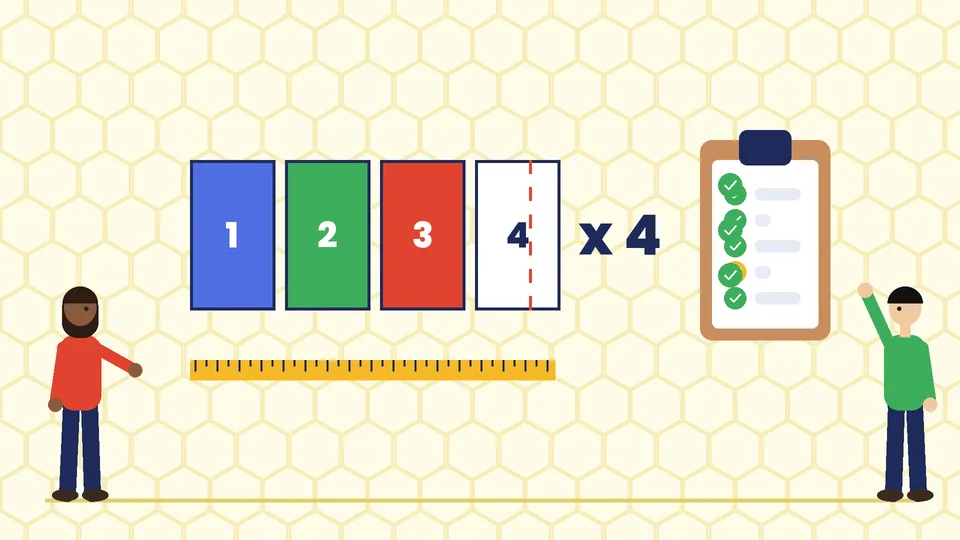
Most small catalogs are saddle-stitched, which means folded sheets stapled along the spine. According to Greener Printer’s saddle-stitched booklet guide, the page count for a saddle-stitched booklet must be a multiple of four, and the count includes the cover pages. So a catalog might have 8, 12, 16 or 24 pages, but not 10 or 14.
Thicker catalogs often use perfect binding, which glues pages into a flat spine. Ask your printer for the minimum and maximum page counts for each binding before you plan the page layout.
Set up print-ready files
Follow your printer’s specifications, which usually include:
- Bleed around the trim edge for images and colors that run to the edge
- A safe area inside the trim for text and important details
- High-resolution images, commonly 300 DPI at the printed size
- CMYK color for full-color printing
- Embedded fonts in a PDF in the format the printer requests
Our commercial printing guidelines explain these settings in more detail. Request a printed proof before the full run, especially for color-critical products.
Plan for mailing
If you mail catalogs, size and weight affect postage. Check the current USPS requirements, or ask your printer or mail house, before you finalize the size and paper.
Digital catalog design
A digital catalog can be a PDF, an online flipbook or catalog pages on your website. Keep these points in mind:
- Design for phones. Many people will open it on a phone, so avoid tiny text that requires zooming.
- Link products. Link each product to its page on your site so readers can buy in one step.
- Keep file sizes small. Compress images so the catalog downloads quickly.
- Make PDFs accessible. Add a logical reading order, real text instead of text in images and alt text for key images.
- Use your website too. Catalog pages in a PDF are not a replacement for product pages that search engines can index. Our guide to Shopify product page design covers what each online product page needs.
Ordering details to check
If customers can order from your catalog by mail, phone or online, include clear ordering instructions, contact details, payment options, shipping costs and your return policy.
Be careful with shipping promises. The Federal Trade Commission’s Mail, Internet, or Telephone Order Merchandise Rule requires sellers to have a reasonable basis for any shipping time they state. If no time is stated, the rule expects shipping within 30 days. If you cannot ship on time, you must notify customers and offer them the option to cancel for a refund. This is general information, not legal advice.
Also check that prices, product photos and specifications match what you actually sell, and add a line such as “prices subject to change” only if your terms support it.
Common catalog design mistakes
- Inconsistent product entries that make comparison hard
- Too many products per page with tiny images and text
- Low-resolution images that look fine on screen but print blurry
- Page counts that do not fit the binding, which forces last-minute blank pages
- No clear way to order or out-of-date contact details
- Forgetting proofreading of prices and SKUs, the most expensive errors to fix after printing
Frequently asked questions
How many pages should a catalog have?
What size should a product catalog be?
What should be on a catalog product page?
Should I make a print or digital catalog?
How do I make a catalog print-ready?
Can a designer help with my catalog?
Get help with your catalog
A well-organized catalog makes it easier for customers to choose and order. If you need a product catalog designed for print, digital or both, contact Pros Inc at 715 J St #200, San Diego, CA 92101, or call (858) 652-8920.